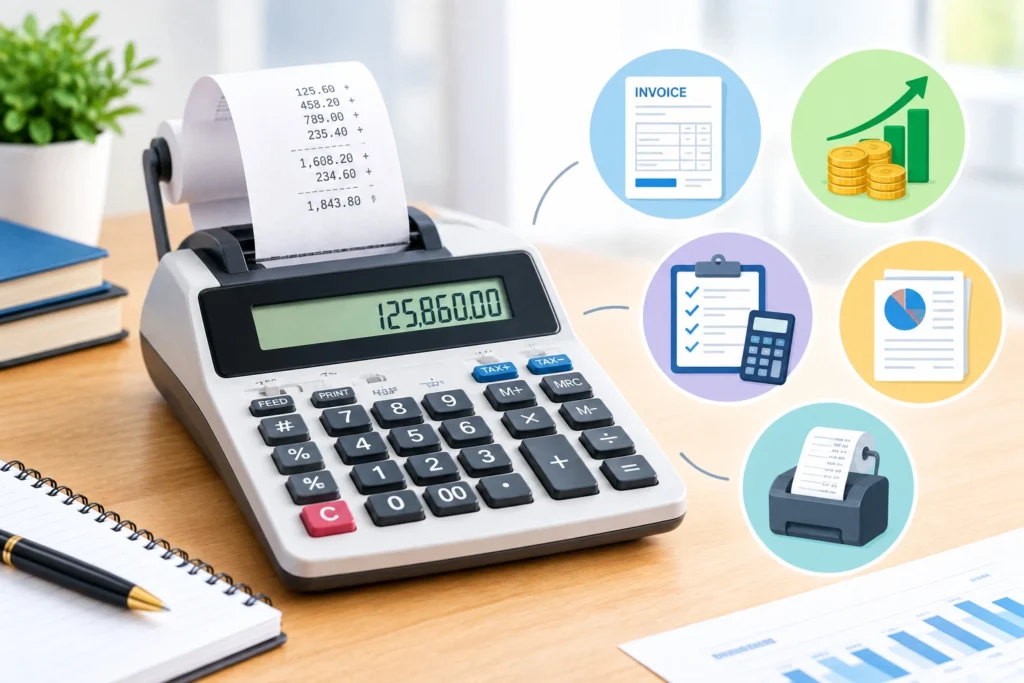
The U.S. Census Bureau reported that 36.4 million employer and nonemployer businesses generated $50.0 trillion in receipts in 2023. Those transactions require accurate totals, taxes, margins, and reconciliations. What is a printing calculator in this environment? It displays results and prints entries, operators, subtotals, and totals onto paper, creating an audit trail.
Unlike a phone app, the tape can be attached to a deposit slip, expense packet, inventory count, or reconciliation. This guide explains its controls, value, limitations, and relationship to an adding machine calculator and digital tools.
What Is a Printing Calculator and How Does It Work?
A printing calculator combines electronic arithmetic with a printer. Its keypad sends commands to a processor; firmware applies arithmetic, tax, markup, memory, or item-count rules; the display shows results; and the printer records the sequence.
Desktop units may use ink rollers or thermal paper. Common parts include:
- Numeric, decimal, and arithmetic keys
- Grand-total, subtotal, memory, tax, and markup controls
- Decimal-position and rounding selectors
- Print, nonprint, and item-count modes
- Display, processor, paper roll, printer, and power supply
Canon’s official P170-DH-3 manual documents print, item-count, currency, decimal, and tax modes. These controls show why what is a printing calculator involves process documentation, not merely arithmetic.
Why Printing Calculators Remain Important
Businesses need evidence of how totals were produced. A tape lets reviewers trace numbers, identify transpositions, initial checks, and retain calculations with source documents. It supports cash drawers, sales, invoices, petty cash, payroll, and inventory extensions.
Key advantages include:
- Visible entries speed review.
- Printed subtotals support batching and reconciliation.
- Dedicated keys reduce repeated formulas.
- Offline operation avoids browser distractions.
- Paper records accompany accounting files.
However, what is a printing calculator worth depends on workflow. It does not replace accounting software, bank records, approvals, or judgment. A perfect tape can still document an outdated tax rate or an omitted transaction.
How to Use a Printing Calculator Correctly
Learning how to use a printing calculator starts with its selectors and manual because percentage, rounding, and add-mode behavior differ.
- Install the correct paper and ink roller or thermal roll.
- Select print mode, decimal places, and rounding.
- Clear the register, memory, grand total, and item count.
- Enter each amount and press plus or minus.
- Use subtotal to review a group without ending it.
- Apply tax, markup, discount, or currency functions after checking stored rates.
- Press total, inspect the tape, and compare it with source documents.
A cashier adding $125.50, $79.95, and $44.55, then subtracting a $20.00 refund, should expect $230.00. Estimation exposes duplicate entries or misplaced decimals.
Casio’s official guidance says to verify stored tax rates and explains that add mode can insert two decimals automatically. An unnoticed selector can still change the answer.
Essential Business Functions
A modern printing calculator may include:
- Addition, subtraction, multiplication, and division
- Percentages, tax addition, and tax subtraction
- Cost, selling price, margin, and markup
- Item counting and grand-total accumulation
- Independent memory, constants, and currency conversion
- Date or time printing on selected models
Canon’s MP25-MG manual documents item counting, tax controls, cost-sell-margin calculations, and grand-total memory. These capabilities explain what is a printing calculator designed for: repetitive commercial arithmetic that benefits from a visible sequence.
Main Types of Printing Calculators
1. Heavy-Duty Desktop Models
These larger devices offer wide keys, faster printing, durable mechanisms, and business functions.
Pros
- Comfortable for sustained entry
- Reliable paper handling and tapes
- Useful tax, margin, count, and total controls
Cons
- Requires desk space and supplies
- Often depends on mains power
- Costs more than a basic calculator
2. Compact Printing Models
Compact units serve mobile bookkeepers, small counters, home offices, and occasional users.
Pros
- Easy to carry and store
- Lower cost
- Produces a physical tape
Cons
- Smaller keys and display
- Slower or narrower printing
- Fewer specialized functions
3. Specialized Accounting Models
These models emphasize tax, currency, margin, item counting, and multiple totals.
Pros
- Speeds recurring commercial work
- Reduces manual formulas
- Fits retail and bookkeeping routines
Cons
- Model-specific sequences require training
- Stored rates can become outdated
- Extra features may complicate simple totals
4. Digital Print-Tape Calculators
Software versions imitate a tape and let users save, edit, export, or print calculation history.
Pros
- Searchable and paperless
- Supports remote work
- Easier to correct before finalizing
Cons
- Depends on a device and software
- Editable history may provide weaker evidence
- Privacy and retention practices vary
These options show why what is a printing calculator should be answered by volume, controls, portability, and recordkeeping needs.
Adding Machine vs Printing Calculator
The phrase adding machine calculator can mean a mechanical machine, electronic accumulator, or printing calculator. Historically, these devices focused on addition and subtraction. Computer History Museum notes that Pascal built early adding machines in the 1640s for tax arithmetic.
The adding machine vs printing calculator distinction is functional. A traditional adding machine accumulates columns; a printing calculator usually adds multiplication, division, percentages, memory, tax, markup, and configurable decimal or rounding settings. Listings sometimes overlap, so compare specifications rather than names.
Choose an adding machine calculator for straightforward column totals and an advanced printing model when reviews require margins, tax, item counts, or several subtotal levels.
Printing Calculator vs 3D Printing Cost Calculator
A 3d printing cost calculator is unrelated to paper-tape arithmetic. It estimates additive-manufacturing costs from material, machine time, labor, energy, setup, post-processing, failures, and overhead.
NIST’s study of additive-manufacturing economics explains that cost effectiveness varies by process, material, equipment, production volume, and supply-chain conditions. A reliable 3d printing cost calculator should therefore disclose assumptions instead of presenting one universal price.
InfraTech Hub can link this cluster to its dedicated 3d printing cost calculator, while routing routine commercial arithmetic to the Basic Calculator, Percentage Calculator, Tax Calculator, and Financial Calculator pages.
How to Choose the Right Model
Before buying, define volume, record requirements, key size, print speed, power, decimal modes, tax controls, and retention. The adding machine vs printing calculator decision should consider whether multiplication, margin, currency, and item counting are necessary.
Choose the simplest device that produces the required evidence. Confirm replacement supplies, test the keyboard, review the warranty, and train employees on one documented procedure. For confidential totals, decide how tapes will be stored and destroyed.
Common Errors and Control Checks
Frequent errors include duplicate entries, wrong signs, forgotten memory, stale tax rates, incorrect decimal selectors, premature totals, and unreadable tapes. When learning how to use a printing calculator, reconcile the tape to independent records and mark corrections clearly rather than overwriting them silently.
Managers should test stored rates, observe user technique, and ensure printed calculations support rather than bypass accounting controls.
Conclusion
The practical answer to what is a printing calculator is a business device creating a traceable arithmetic record. It adds value when speed, documentation, and review matter, but remains part of a wider control system.
Explore InfraTech Hub’s Different Types of Calculators pillar and Printing, Basic, Percentage, Tax, and Financial Calculator resources. Understanding what is a printing calculator helps teams select the right tool carefully for each workflow, for accurate, efficient, and defensible daily recordkeeping.